Introducing ContactsFlow™ : The AI Powered Contact Manager
Shared Contacts for Gmail™ is now ContactsFlow™ reflecting its evolution into an AI-powered contact management platform. Contacts are automatically created, enriched, and synced across Gmail, Google Contacts, mobile devices, directories, and CRMs. With intelligent email capture, voice and image-based creation, granular permissions, and centralized directory sync, ContactsFlow™ ensures contacts stay accurate, secure, and seamlessly connected across your team’s ecosystem.
Why the name change to ContactsFlow™
Gmail Addon and it's features with AI
How ContactsFlow™ helps your team


We’re excited to announce that Shared Contacts for Gmail™ is now ContactsFlow™.
Why the rebrand? Because our product has grown well beyond shared labels and lists: we’re now delivering an AI-enhanced, user-friendly contact manager where contacts are effortless to create, always up to date, and flow across your team’s devices and directory.
Why the name change
We chose the name ContactsFlow™ for three key reasons:
AI-Powered Contact Creation & Management – Contacts are created, enriched and updated with the help of artificial intelligence.
Contacts Made Easy – Whether via an email, screenshot, voice note or business card photo, contact creation is simplified.
Flow Across Your Ecosystem – Contacts aren’t siloed anymore: they sync across Gmail, Google Contacts, mobile devices, directories, CRMs, and more.
In short: we’re moving from “shared contacts” to “contacts that flow and evolve”.
Gmail Addon
With the Gmail Add-on, once installed, the AI-powered automation works seamlessly in the background, reading your emails to capture key contact details like names, phone numbers, and job titles from email signatures. Its then automatically creates or updates contacts and even adds helpful notes, such as summarizing your email conversations or updating custom fields like customer ID or birthday.
Key features at a glance:
Effortless Sharing & Syncing: Share Google Contact labels with individuals or groups, instantly syncing across Gmail, Google Contacts, Calendar, Drive, mobile devices (iPhone, Android), and more. Keep your team’s contact list consistent and centralized.
Automated AI Updater: AI detects contact information from emails and auto-updates your contacts, reducing duplicates and outdated records. It even creates new contacts from audio notes, signatures, or messages.
Advanced Permissions & Privacy: Set custom permission levels such as “View Only,” “Can Edit,” and “Can Share.” Hide sensitive fields from unauthorized users to ensure compliance with your privacy and security policies.
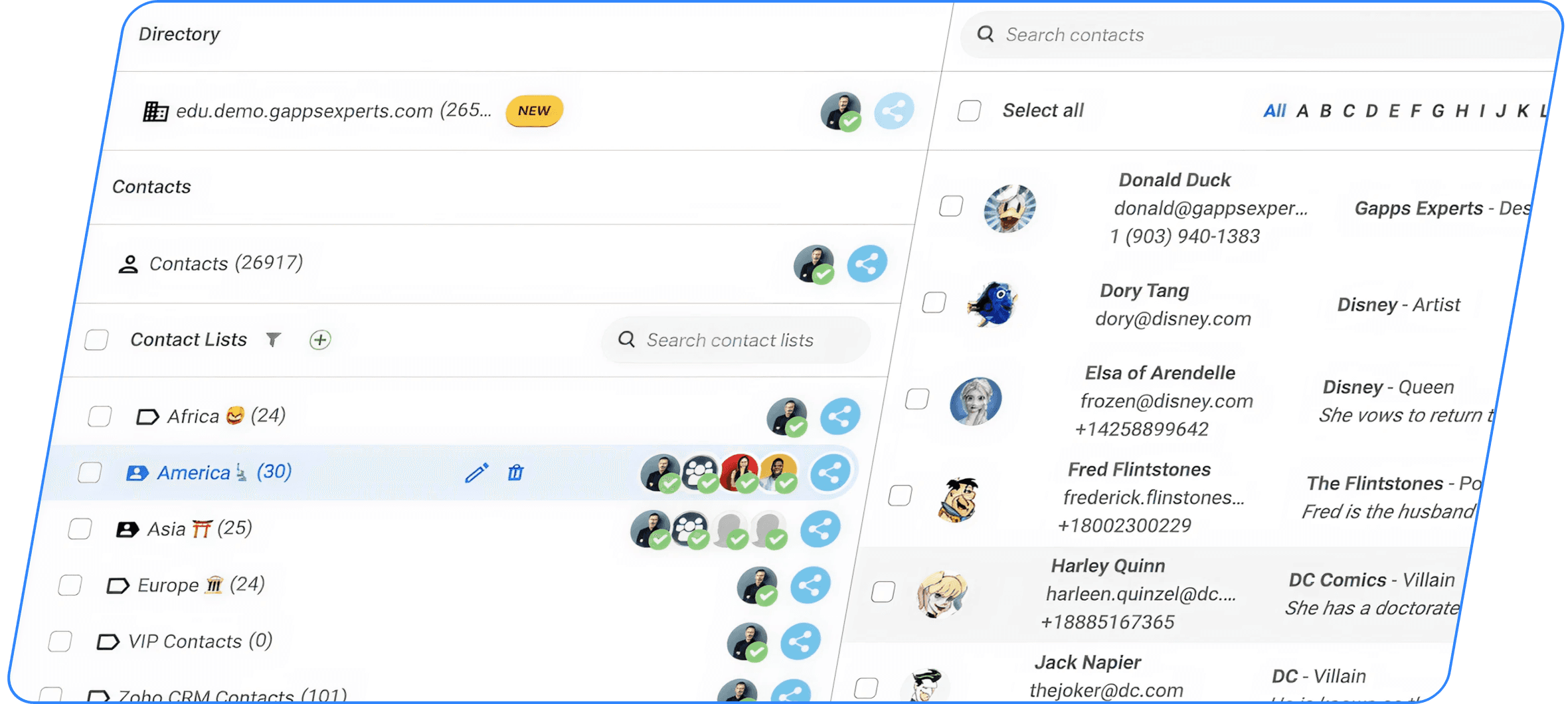
Centralized Google Workspace Directory: Sync your Google Workspace Directory and LDAP with mobile devices, allowing employees to update their own profiles and maintain an always up-to-date company address book.
Personalized Contact Cards: Add custom fields like “Customer ID,” “Plan Type,” or “Onboarding Date” to tailor contact cards for your team’s needs. Improve contact organization by using filters like “Sales Region,” “Customer Type,” and more.
Search, Filter, and Organize: Use advanced search to find contacts by company, location, job title, or tags. Filter by roles, teams, or custom fields for more effective contact management.
Integration with Your Tools: The Gmail Add-on integrates natively with Gmail, Google Contacts, CRMs, Active Directory, ERP systems, and over 3,000 other apps via automation or public APIs.
What’s new: AI features and enhancements
Here’s a breakdown of the major enhancements you’ll see in ContactsFlow™.
AI-driven contact creation
Automatically create or update contacts by scanning emails, signatures, business cards or images.
Add contacts via voice or call recording: simply speak or record a note and ContactsFlow™ captures the information.
Upload a photo or screenshot (e.g., business card, badge) and the AI extracts the contact data.
Hidden fields & granular Permissions
Define who can view or edit which fields—protect sensitive data by authorising only certain users.
Hide specific fields entirely from users who shouldn’t access them, helping you stay compliant and secure.
Two-way directory sync + mobile
Sync your Google Workspace directory, LDAP or Active Directory with users’ mobile devices (iPhone, Android) so everyone uses the same up-to-date company address book.
Let users update their own directory profiles—delegate editing to end-users so your directory remains current and relevant.
Use ContactsFlow™ to manage your Google Workspace Directory contacts and sync them with your users’ mobile devices or MS Outlook™.
Push zone (call to actions)
Within ContactsFlow™, contact cards can surface a Push Zone — enabling actions such as call, email, schedule a calendar event — making contacts actionable rather than static.
Note: this feature is consistent with our product direction and user interface design (AI-powered, flow-enabled contact cards).
Last created contacts
It displays the most recent contacts created, including their names, titles, and the date and time of creation, along with the creator’s details.
How ContactsFlow™ helps your team
For admins and IT teams:
You gain a central dashboard where all contacts like Google Contacts labels, shared lists, directory contacts are managed in one place. You can impose field-level permissions, hide sensitive data, sync across devices and directories, and delegate updates to users, even non-admins. This delivers better governance, fewer duplicates, and always-accurate data.
For everyday users:
No more manual data entry. The AI builds contacts for you from emails, images or voice notes. Your mobile devices, CRM, Google Contacts and directory stay in sync. When you grab a business card, snap a photo, or receive a voicemail, a contact is created in seconds.
For mobile/field teams:
ContactsFlow™ ensures the company address book is always up to date on your phone whether you’re using iPhone or Android. Changes made by users propagate automatically. The Push Zone makes it effortless to call, email or schedule from the contact card.
Conclusion
With the transition to ContactsFlow™, we’re delivering more than shared contacts, we’re delivering an intelligent contact management platform built for today’s mobile, AI-enabled, collaborative world.
ContactsFlow™ means faster creation, smoother sharing, stronger security, and always-accurate directories.
Thank you for trusting us with your contact data. We’re excited to continue supporting your team with smarter, more powerful tools under the new ContactsFlow™ brand.
Leave a comment :
No comments yet. Be the first!