How to Use a Gemini Gem as Your Personal Work Assistant
Learn how to create a personalized Gemini Gem that works as an AI communication advisor using meeting transcripts, email threads, notes, and conversation records. This guide explains how Gemini Gems work, how to configure instructions and knowledge sources, and how to use a custom Gem to summarize meetings, identify decisions and action items, recall past discussions, and analyze professional communications.
Gemini Gems let you create customized AI assistants with specific instructions and knowledge sources.
You can provide meeting transcripts, email discussions, notes, chat summaries, and project documents as reference material.
A communication-focused Gem can help summarize meetings, identify decisions, extract action items, and recall previous discussions.
Clear instructions help define whether your Gem acts as a meeting analyst, decision tracker, communication assistant, or project memory tool.
Once configured, you can ask natural-language questions such as “What decisions were made?”, “What tasks are pending?”, or “What did the client say about the deadline?”
Gemini Gems can reduce the need to manually search across multiple communication records by giving you a single place to query the information you provide.


Imagine having an AI assistant that remembers every meeting, email, and conversation you’ve had and can instantly answer questions about them.
Instead of searching through dozens of emails, chat threads, or meeting notes, you simply ask:
“What were the key decisions from last week’s marketing meeting?”
“What did John promise during the client call?”
“Summarize my conversations with this customer.”
With Gemini Gems, you can create a personalized AI advisor trained on your own communications, such as emails, meeting transcripts, and notes.
Once set up, your Gem becomes a living memory and analysis assistant that helps you review conversations, extract insights, and stay organized.
We’ll explain how it works.
1. What Is a Personalized Gemini Gem?
A Gemini Gem is a customized AI profile inside Google Gemini that you configure with specific instructions and knowledge sources.
Instead of a generic AI assistant, your Gem can be trained on your own information, including:
Meeting transcripts
Email threads
Notes and summaries
Text messages or chat logs
Documents related to projects or clients
The result is a personal AI advisor that understands your communication history and can answer questions about it.
Think of it as your private assistant.
2. How Gemini Gems Work
Gemini Gems are built using Google’s Gemini AI system.
Each Gem contains three key elements: Instructions, Knowledge, and Interaction.
Instructions: You define the role and behavior of the Gem.
For example:
Meeting summarizer
Communication analyst
Decision tracker
Project memory assistant
Knowledge: You provide sources the Gem should learn from, such as;Meeting transcripts
Email summaries
Conversation logs
Notes from discussions
Interaction: You chat with your Gem like a normal AI assistant, but it answers using the context of your communications.
3. Creating Your Personalized Communication Gem
3.1 Define the Role of Your Gem
Start by deciding what you want your Gem to do.
For example:
Meeting Intelligence Gem
Their purpose would be to:
Analyze meeting transcripts
Extract action items
Identify decisions
Summarize discussions
Communication Memory Gem
Their purpose would be:
Track conversations
Recall commitments made during meetings
Answer questions about previous discussions
Provide quick summaries of email threads
3.2 Train Your Gem on Your Communications
Once you know the role, you can start adding your data.
Examples of useful sources:
Meeting transcripts (Zoom, Google Meet, Teams)
Notes from online meetings
Email summaries from Gmail
Text or chat transcripts
Project documents
The more relevant information you provide, the smarter your Gem becomes.
4. Step-by-Step: Creating a Gemini Gem
Here’s how to do it step-by-step:
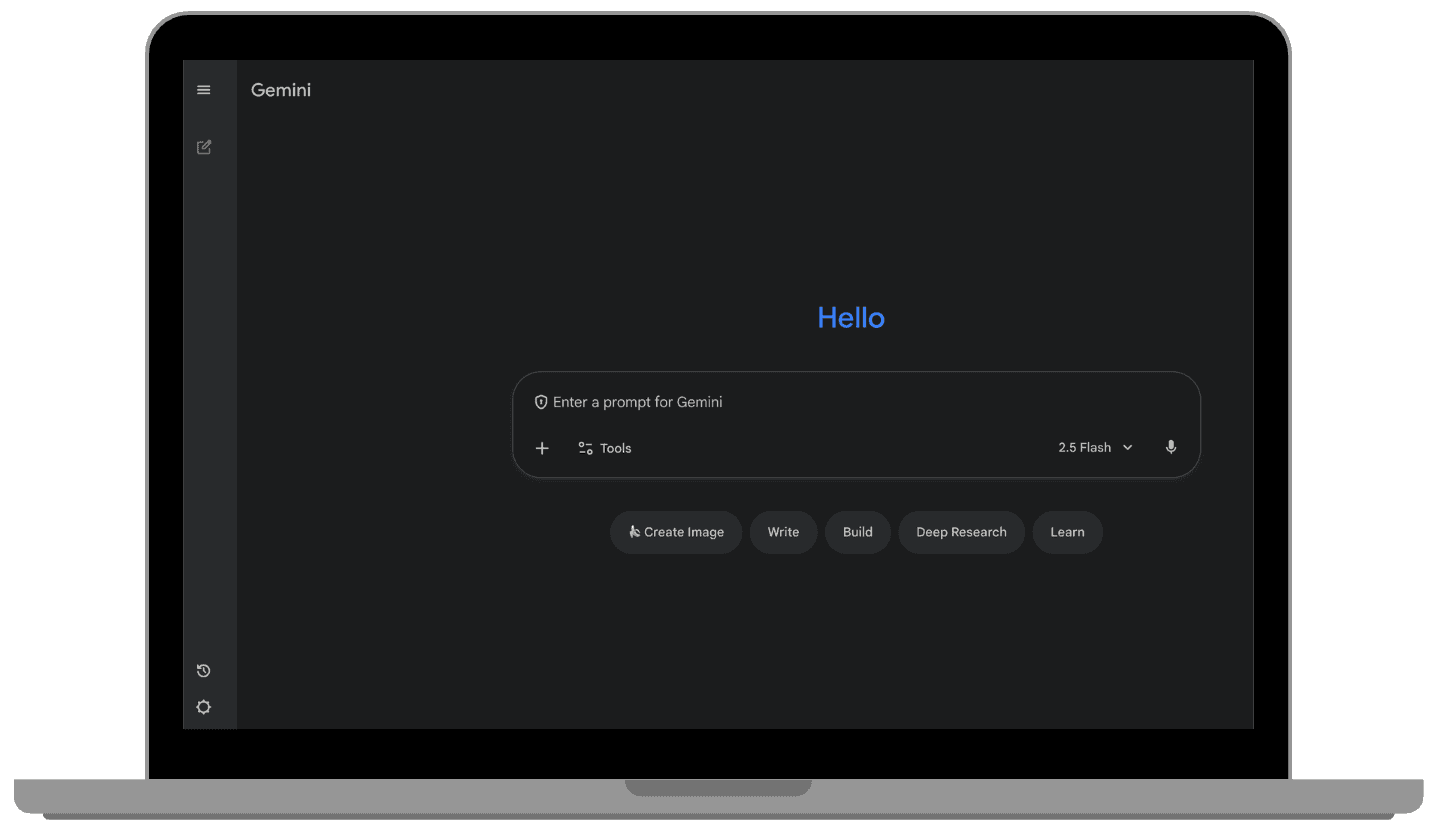
Open Gemini on your browser or app.
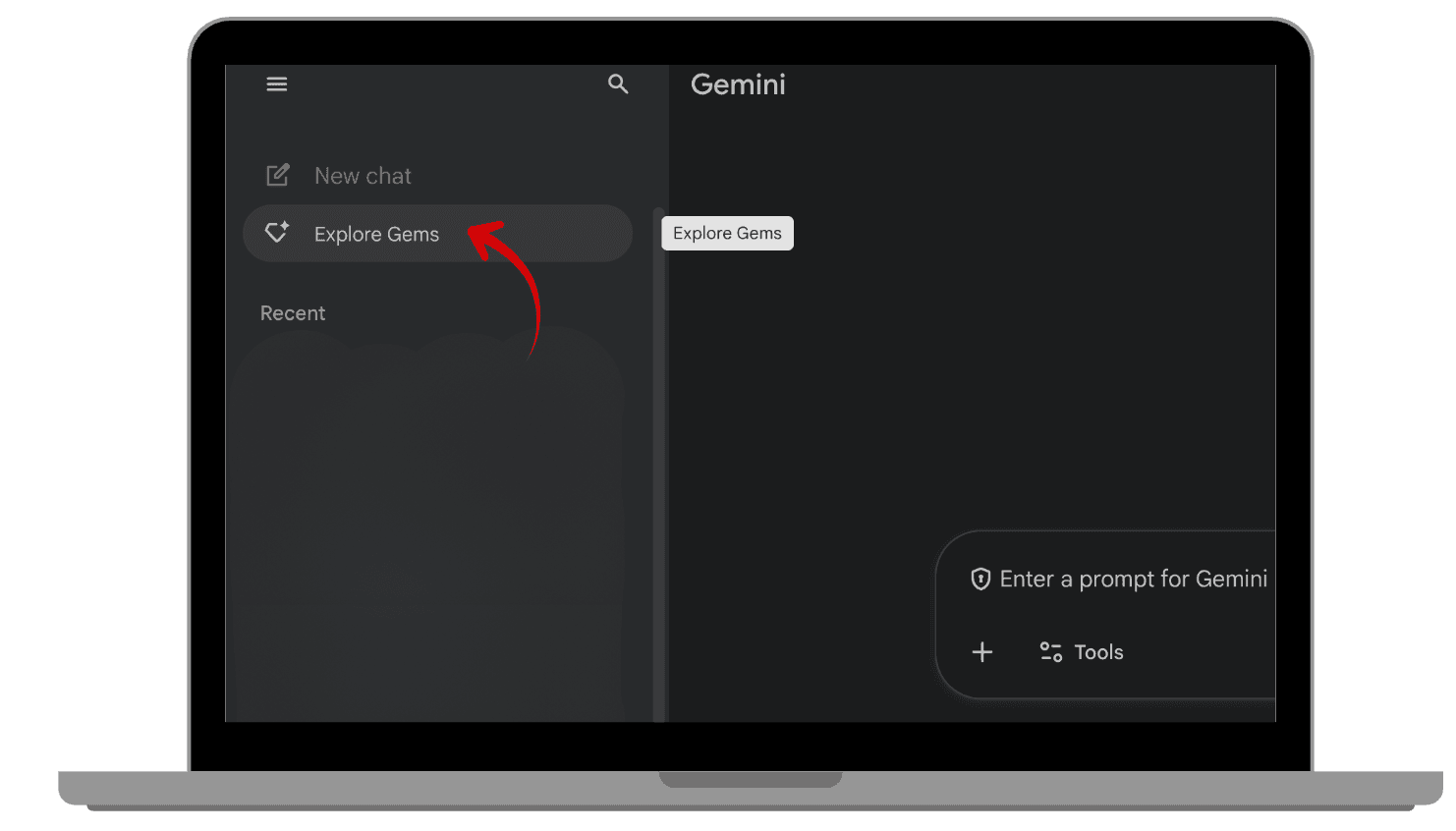
Click the three lines on the left corner and click “Explore Gems”.
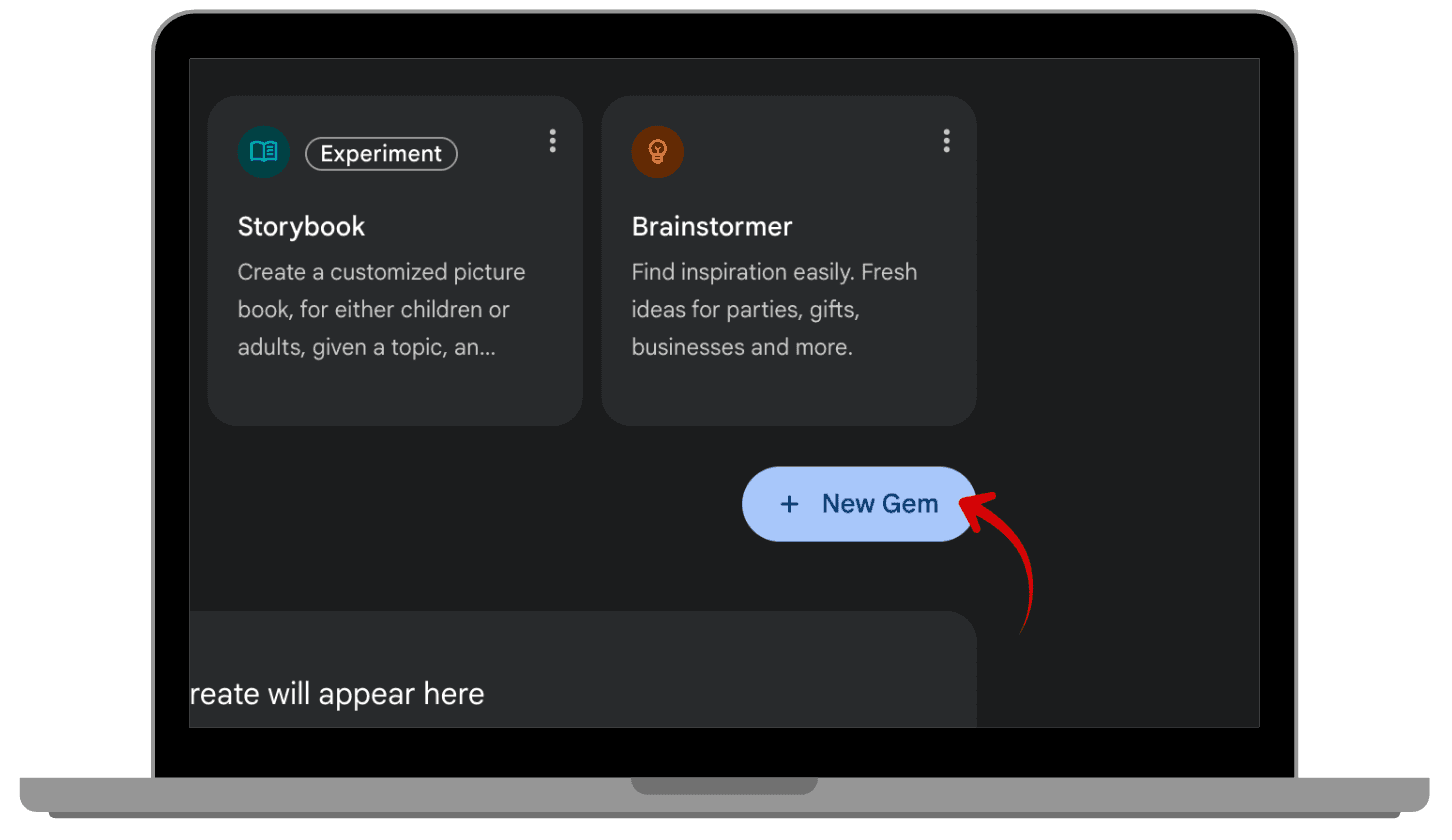
Click “ + New Gem “
Add your Gem’s name and description
Example:
Name: Meeting Intelligence Advisor
Description: An AI assistant that analyzes meetings, emails, and conversations to summarize key information and decisions.Write clear instructions.
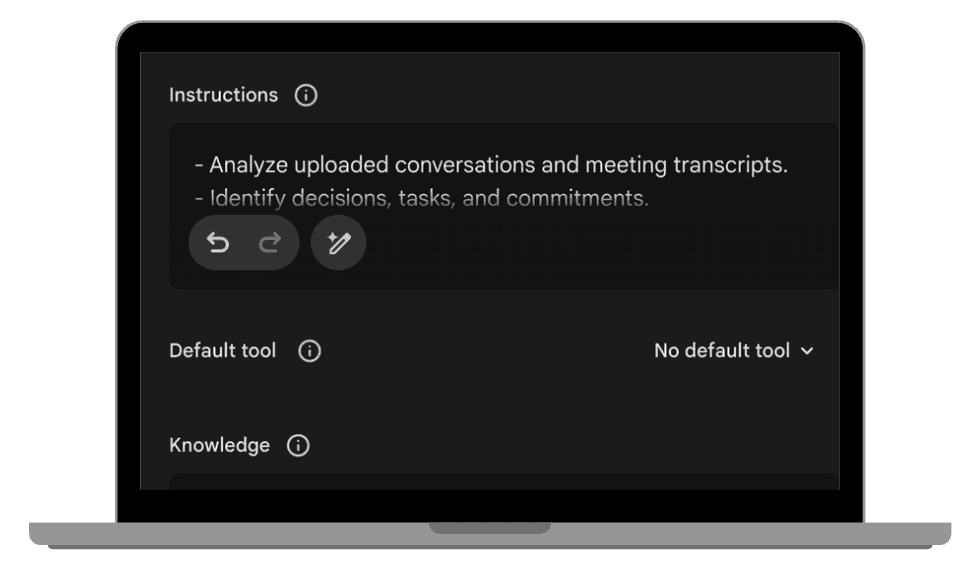
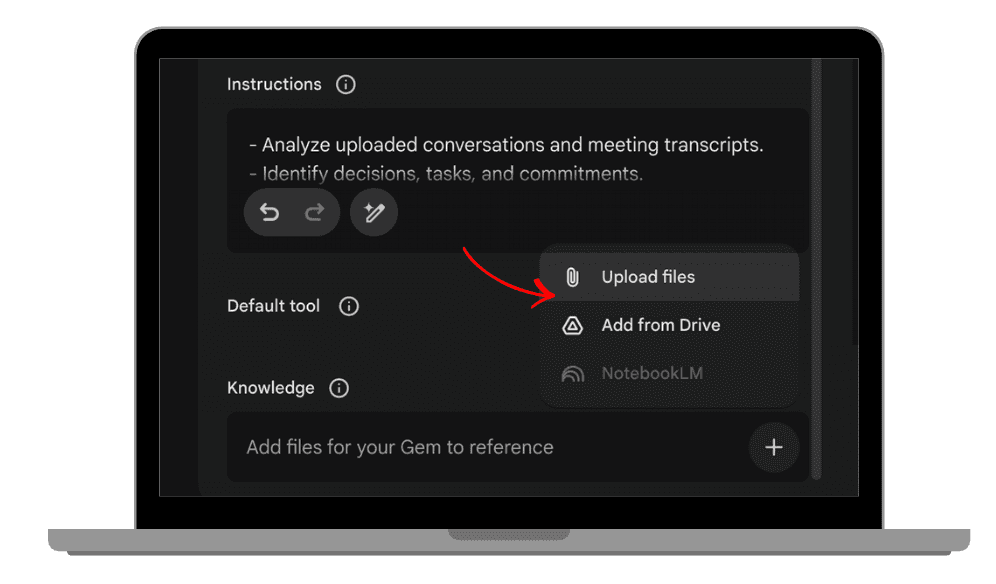
Example instructions:
- Analyze uploaded conversations and meeting transcripts.
- Identify decisions, tasks, and commitments.
- Provide clear summaries when asked.
- Answer questions about past communicationsUpload or paste your knowledge sources, such as:
- Meeting transcripts
- Email discussions
- Notes from conversations
- Chat summaries
Gemini will process this information and create your customized advisor.
 |  |
|
|
 |  |
|
|
 |  |
|
|
5. How to Use Your Gemini
Communication Gem
Once your Gem is created, you can start asking questions about your communications.
Examples:
Meeting summaries
“Summarize the main decisions from the product meeting.”
Action items
“What tasks were assigned during yesterday’s meeting?”
Conversation recall
“What did the client say about the project deadline?”
Email analysis
“Summarize the key points from this email thread.”
Your Gem reads the information it was trained on and produces clear, contextual answers.
6. Why This Feels Like Having a Personal Meeting Analyst
Traditional note-taking systems require you to manually search through:
Emails
Meeting recordings
Notes
Chat messages
A personalized Gemini Gem does the searching for you.
Instead of digging through documents, you simply ask a question.
Your Gem acts like:
A meeting analyst
A communication memory
A decision tracker
All available instantly.
Build an AI That Understands Your Conversations
Gemini Gems allow you to create personalized AI advisors trained on your own communications.
Instead of losing time searching through emails and meeting notes, you can simply ask your AI assistant:
What decisions were made?
What tasks are pending?
What did someone promise during a meeting?
By training a Gemini Gem on your conversations, emails, and meeting transcripts, you create a custom AI that understands your professional interactions and helps you stay organized.
With your Gemini Gem in place, every conversation becomes a source of insight you can use anytime.
Leave a comment :
No comments yet. Be the first!